"Where is a cosy vegan-friendly spot for a group of 4 with a table available at 7 PM?"
That is one of Google’s own example queries for Ask Maps, the new AI-powered conversational interface inside Google Maps. Ask Maps lets users ask full-sentence questions instead of typing short keyword searches. The example looks casual, but it is not random. Google picked it because it showcases the kind of business data Ask Maps now needs to answer a real customer question.
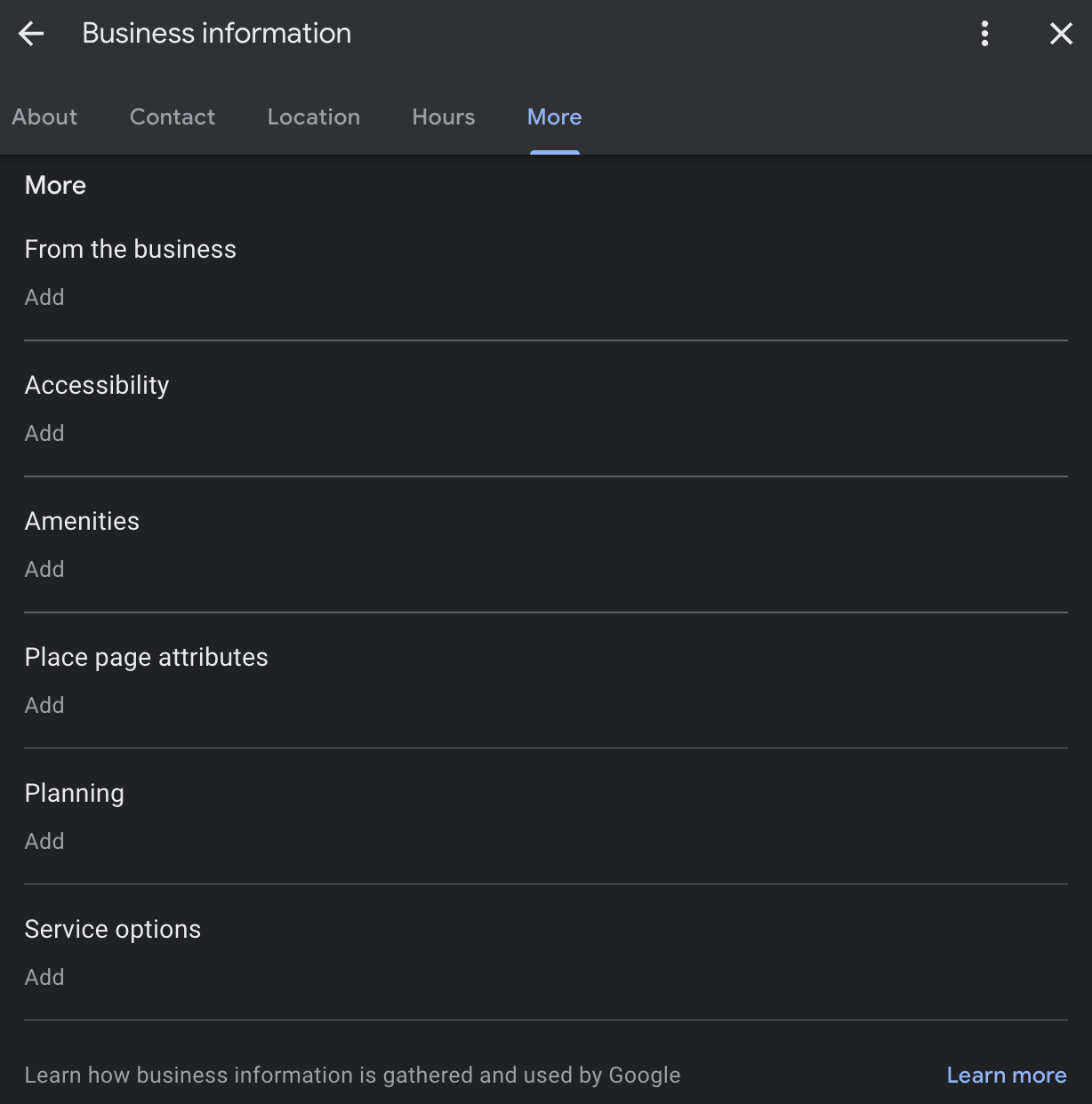
When Google launched Ask Maps, it gave two example queries, and both are built from specific GBP attributes that most businesses still leave blank. A Google Business Profile, or GBP, is the free Google listing customers see on Search and Maps. An attribute is a yes/no fact inside your GBP dashboard, such as “outdoor seating,” “wheelchair accessible,” or “accepts reservations.”
Reverse-engineering Google’s examples surfaces three attributes that quietly became make-or-break for conversational search. This post explains which ones matter, why they matter, and how to fix yours in under 30 minutes.
The detective work — what Google's example queries tell us
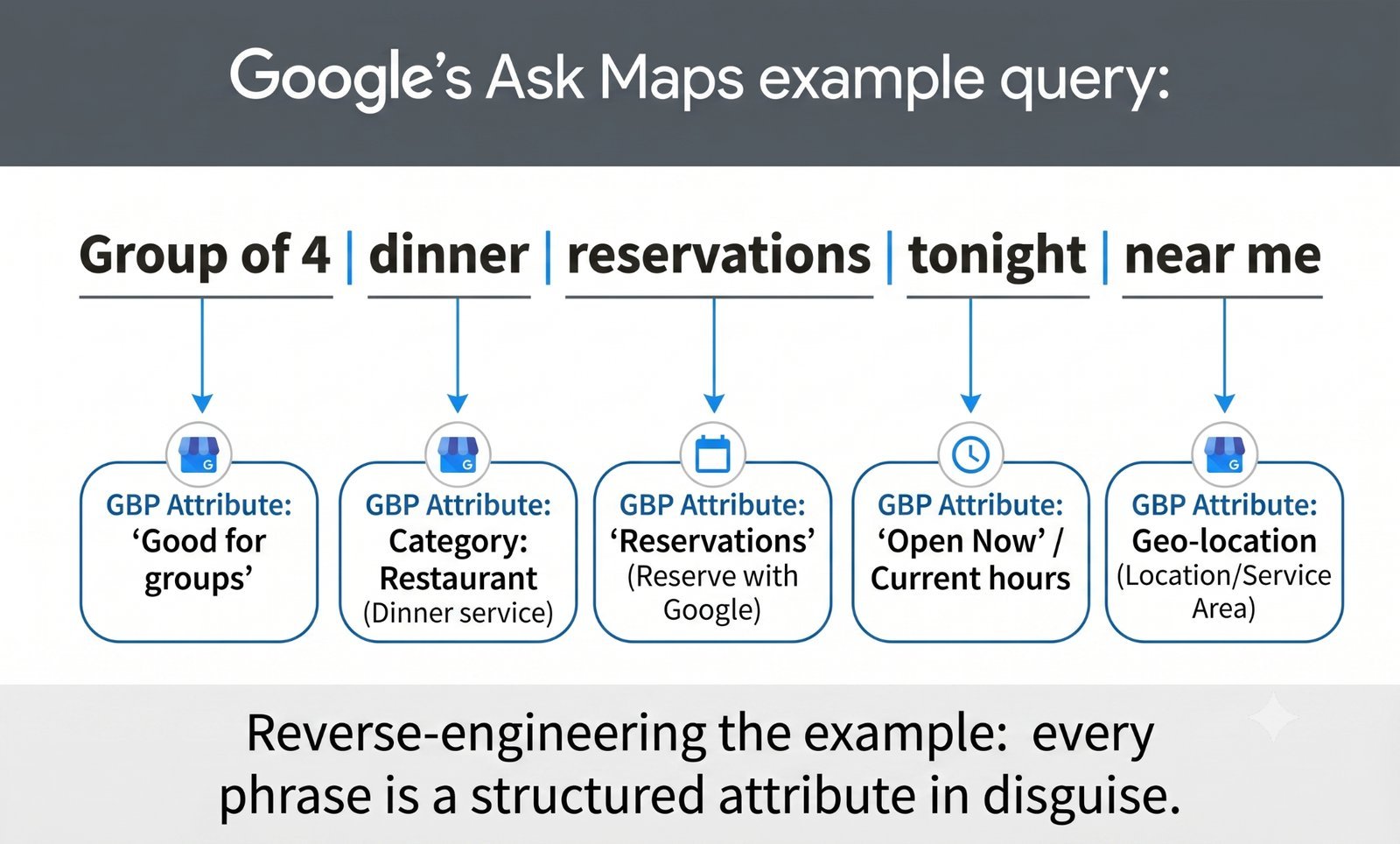
Google’s first example query is doing more work than it looks like:
"Where is a cosy vegan-friendly spot for a group of 4 with a table available at 7 PM?"
Break it down phrase by phrase:
- “Cosy” is not usually a structured GBP attribute. Google has to infer it from reviews, photos, and maybe business descriptions. An inferred attribute is a feature Google guesses you have based on other signals, even if you have not set it directly. Reviews that mention “cosy,” “quiet,” “warm atmosphere,” “intimate,” or “great ambience” give Google something to work with.
- “Vegan-friendly” may map to a structured food attribute, depending on the business category and available GBP options. If a restaurant has “vegan options” available and has set it properly, Google gets a clean signal. If not, Ask Maps may need to infer it from menu text, review content, or photos. That is weaker.
- “Group of 4” points toward the “Good for groups” attribute, or a category equivalent. This is exactly the kind of structured signal most owners ignore because it feels minor. It is not minor anymore. A query asking for a group-friendly place needs some way to filter out businesses that only suit one or two people.
- “Table available at 7 PM” points to booking data. That could mean Reserve with Google, a booking partner integration, a booking link, or another live availability signal. Reserve with Google is Google’s booking integration that lets a customer tap “Book” on your profile to reserve a table, appointment, or service through approved partners or connected booking systems. Without booking data, you may not qualify for “available tonight” searches at all.
Google’s second example query tells the same story in a different category:
"Is there a public tennis court with lights nearby where I can play tonight?"
- "Public" maps to an "open to public" concept attribute (yes for public courts, no for private clubs).
- "Tennis court" maps to the primary business category.
- "With lights" points toward a category-specific feature attribute, such as lighting or night play.
- "Tonight" depends on hours and real-time data. A real-time attribute is a signal that changes minute-to-minute or hour-to-hour, such as "open now," current availability, current wait time, or live booking status.
Google also explained how Ask Maps works in its April 2026 GBP newsletter:
"It 'reads' your reviews for mentions of your atmosphere, scans your photos to verify you have outdoor seating, and checks your real-time attributes to see if you're accessible or pet-friendly."
That is the pattern. Ask Maps reads reviews, scans photos, and checks structured attributes. But structured attributes are the cleanest signal. Google does not have to guess whether you accept reservations if you set it. It does not have to infer whether you are wheelchair accessible if the attribute says yes.
Google’s examples explicitly require structured data that many businesses have never bothered to complete. That is the opportunity.
Attribute #1 — "Good for groups" (or its category equivalent)
“Good for groups” is a structured yes/no toggle that appears for categories like restaurants, bars, cafés, event venues, attractions, entertainment venues, and similar businesses. The exact label and location may vary by category, but the concept is simple: can your business comfortably serve groups?
Ask Maps cares because conversational queries are specific. A person asking for "a group of 4" is not just looking for any nearby restaurant. They want a business that can handle four people at a time; they need it. If your profile leaves "Good for groups" blank, Google may have to infer from reviews, photos, or seating descriptions. That is less reliable than a direct yes/no attribute.
This is how filtering works. Filtering is when Google narrows search results to only businesses that match a specific condition. If someone searches "group-friendly café near me," businesses with a clear group-friendly signal are easier to include. Businesses with blank attributes may be filtered out, even if they could physically serve the group.
Anecdotally, this is one of those attributes many restaurant and hospitality GBPs leave blank because it does not feel urgent. Owners focus on category, hours, menu, and reviews. Fair enough. But Ask Maps changes the value of these small toggles. The boring fields are now eligibility signals.
Here is how to set it:
- Go to your GBP dashboard.
- Click “Edit profile” → “More.”
- Scroll to the “Amenities,” “Crowd,” or similar section. The label varies by category.
- Toggle “Good for groups” to “Yes” if it applies.
- Save.
When NOT to set it: Do not set it if it is not true. If you mostly have two-person seating, limited space, or cannot reliably accommodate groups of four or more, leave it off or set it to no, where Google gives that option. The goal is not to trick Google into showing you for more searches. The goal is to qualify for the searches you can actually serve.
Attribute #2 — Booking method ("Reserve with Google" integration or booking link)
Booking is the biggest practical gap in Google’s first example query. “Table available at 7 PM” is not a vague preference. It is a booking-ready search. The user is not browsing. They want a place they can reserve.
Your booking method can be a Reserve with Google integration through an approved partner, such as a restaurant, salon, healthcare, fitness, or service booking platform. It can also be a manual custom booking link added to your GBP. A custom booking link is not the same as Reserve with Google. The custom link is a clickable URL on your profile. Reserve with Google can trigger a more prominent “Book Online” experience through a partner integration.
Google’s 2026 GBP Best Practices Playbook makes the scale clear:
"Reserve with Google is live in 88+ countries across many business types - including beauty, home services, auto repair, fitness and healthcare."
This is not just for restaurants. That misconception costs service businesses leads. If you run a salon, physio clinic, dental practice, auto repair shop, fitness studio, or home service business, booking readiness matters.
The same playbook says 77% of consumers expect to be able to book services online. That is not an SEO stat in the narrow sense. It is a customer expectation. But Ask Maps sits right at the point where customer expectation and search eligibility meet. If the AI is trying to answer “appointment this afternoon” and your profile has no booking path, you are harder to recommend.
How to set it (manual link route):
- Go to your GBP dashboard.
- Click Edit profile → Contact or Bookings.
- Add the URL of your booking page in the Booking link field.
- Save.
- Note: This shows as a clickable URL but won't trigger the prominent "Book" button unless you go through an integrated partner.
How to set it (integrated partner route):
- Check the list of Google's booking partners at the GBP help docs (or contact your existing booking provider and ask if they are a Reserve with Google partner).
- If they support it, ask them to opt you into their Reserve with Google integration.
- Once connected, your GBP will show a prominent "Book Online" button that redirects to your booking page.
If you take bookings, appointments, reservations, consultations, inspections, or service calls, this is not optional anymore. A business that can be booked from Google is simply easier for Ask Maps to match to high-intent searches.
Attribute #3 — Category-specific accessibility & feature attributes
The third group is broader but just as important: the category-specific attributes sitting inside the “More” section of your GBP dashboard.
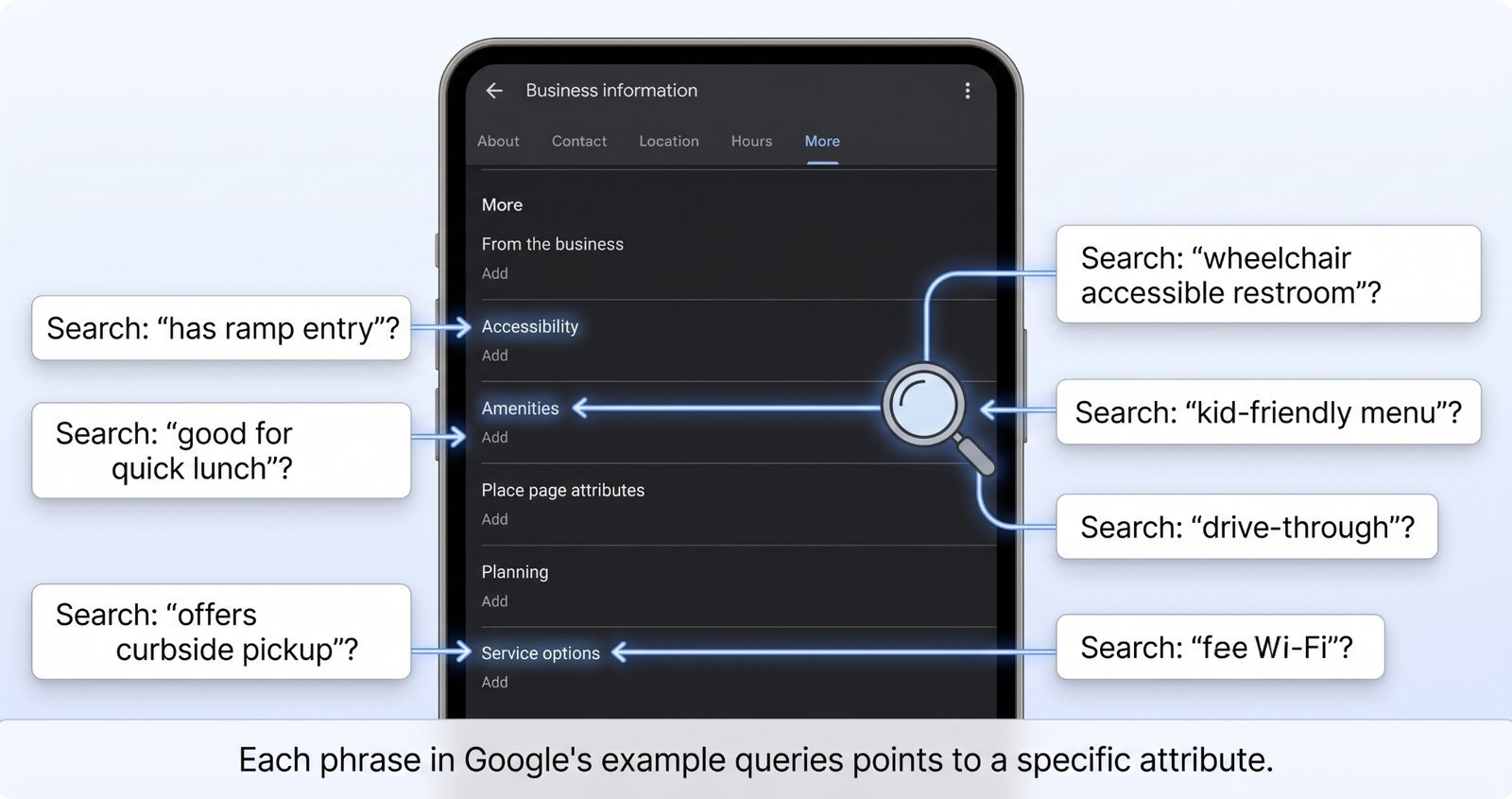
These are the long lists many owners skim once and never revisit. Restaurants may see attributes for outdoor seating, vegan options, gluten-free options, accept reservations, be family-friendly, or offer payment methods. Service businesses may see wheelchair accessibility, language spoken, online appointments, service options, Wi-Fi, or payment types. Attractions may include parking, lighting, public access, family suitability, or pet-related options.
Google’s 2026 GBP Best Practices Playbook is explicit about why these matter:
"Enhance your online visibility and transparency by leveraging key attributes on your Google Business Profile. Details such as 'pet-friendly,' 'Wi-Fi,' or 'outdoor seating' are displayed directly on Google Search and Maps. Accurately utilising these attributes significantly increases your discoverability."
That last word is the point: discoverability. Ask Maps needs reliable facts to narrow results. The more relevant attributes you set, the more specific queries you become eligible for.
This does not mean “set everything to yes,” which is a bad idea. If you claim wheelchair access but your entrance has a step and no ramp, you risk angry customers, bad reviews, and possibly profile issues. If you say you accept reservations, but you are walk-in only, you create friction. Accuracy matters.
The "even no answers help" rule: If you do not have outdoor seating, setting the attribute to "no" tells Google to exclude you from outdoor seating queries. That is fine. You did not want that customer anyway. Worse than no is blank, because blank gives Google no clean signal at all.
Here is the 15-minute fix:
- Go to your GBP dashboard.
- Click “Edit profile” → “More.”
- Scroll through every attribute category: Amenities, Service options, Accessibility, Payments, Planning, Crowd, Highlights, or whatever appears for your category.
- For each relevant attribute, select Yes or No. Do not leave it blank if it applies to your business.
- Save.
For a typical service business, this may take 10 to 15 minutes. For restaurants, hotels, venues, and attractions, allow closer to 30 minutes because the attribute list is usually longer.
A 20-minute attribute upgrade checklist
Do this now while the idea is fresh:
- Open your GBP dashboard.
- Run through every available attribute. Set Yes or No where the option applies. Do not leave relevant fields blank.
- Specifically set "Good for groups" or the closest category equivalent if your business can serve groups.
- Add a booking link or start the Reserve with Google integration process if your business takes appointments, reservations, consultations, or service bookings.
- Set every accessibility attribute accurately, including wheelchair access, hearing accommodations, language support, parking, or entrance access—these are deciding factors for accessibility-sensitive queries.
- Save your changes and check the public-facing profile to confirm the updates are showing.
This is not glamorous local SEO work. It is not a clever hack. It is cleaner data. And cleaner data is exactly what Ask Maps needs.
The bottom line
Google’s example queries are not random. Each one requires specific structured attributes: group suitability, booking availability, public access, lighting, hours, accessibility, and category-specific features.
The businesses that win conversational queries are the ones that fed the AI complete attribute data before everyone else realised the blank toggles mattered. Keywords still matter. Reviews still matter. Photos still matter. But if Google needs to filter for a specific feature and your profile is blank, you are making the AI guess.
Twenty minutes of attribute work can pay off the next time someone asks Ask Maps for exactly the kind of business you run.
Ready to see what you're missing? Run a free audit at checklocalseo.com — we'll flag exactly which attributes you're missing for your specific business category.
Frequently Asked Questions
Q: Will Google figure out my attributes from my photos and reviews if I don't set them? A: Sometimes. Google can infer attributes (e.g., it might guess you have outdoor seating from photos that clearly show tables outside). However, inferred attributes are less reliable than those you set explicitly. Don't rely on inference—set them explicitly.
Q: Are there attributes I shouldn't set? A: Only those that don't apply to your business or that you can't reliably deliver. Don't toggle "wheelchair accessible: yes" if your entrance has a step and no ramp. Don't toggle "accepts reservations" if you're walk-in only. Misrepresentation can lead to profile suspension and negative reviews.
Q: How often do I need to revisit attributes? A: Once a quarter at minimum, and any time Google adds new attribute options (which happens 3–4 times a year). The GBP dashboard sometimes adds new categories based on consumer search trends without notifying you.
Q: My category doesn't have many attributes available. What do I do? A: Use what's available, and use Google Posts and your business description to fill the gaps. Posts let you advertise specific features ("We now offer outdoor seating!") that the AI can read even if there's no structured attribute toggle for it.
Q: Does setting more attributes mean I'll rank higher for all queries — or just more relevant ones? A: More relevant ones. Setting accurate attributes means you show up for queries you can actually serve and don't show up for queries you can't. That's a quality signal; Google rewards businesses that filter themselves accurately.
Attribute coverage is one of many checks the audit runs automatically.