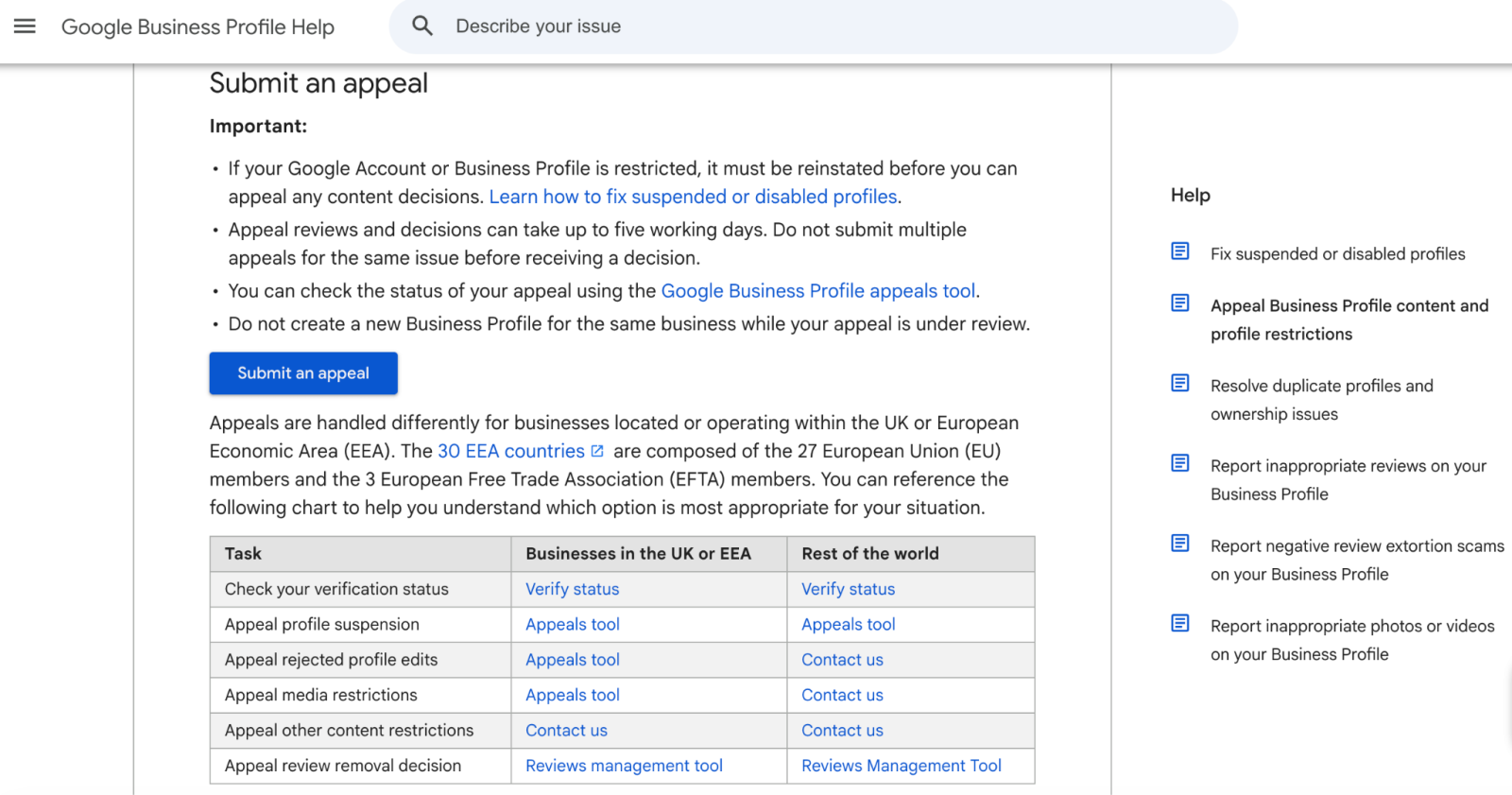
“Bob’s Plumbing Best Plumber San Diego” used to be the kind of GBP name that might slip through for months. It was messy, explicitly against policy, but sometimes effective enough that owners and agencies kept pushing the boundaries.
That loophole is closing. Google is now using Gemini, its advanced AI model family, to automatically flag “unhelpful” edits to business names. The most immediate target is keyword stuffing: adding extra services, target cities, and promotional taglines to a business name to artificially game local search rankings.
However, a more complex issue is emerging: legitimate business names can easily get caught in the crossfire if they look like keyword stuffing to an automated AI algorithm. This guide breaks down what triggers the new Gemini filter, what remains safe, and how to protect your profile if your real-world business name is unusual enough to risk a false positive.
What Google announced (and what they didn't say)
Google framed this technical shift as part of a broader, ongoing initiative to maintain the integrity of local search data. In their May 2026 GBP newsletter, the company stated:
"Authentic community content helps your profile shine, and we take our responsibility seriously to keep this information trustworthy."
Then came the core operational update:
"We're now using our Gemini models to automatically catch unhelpful edits to business names faster than ever."
It is equally important to notice what Google didn’t say. They did not explicitly define what constitutes an “unhelpful” edit, they did not publish a cheat sheet of exact trigger patterns, and they did not outline an automated appeals process tailored to these AI rejections. This ambiguity is intentional; it prevents malicious actors from systematically reverse-engineering the filter.
The practical reality for local marketers and business owners is straightforward. Gemini does not just look at the text of your proposed name edit in isolation. It evaluates the edit against a broader ecosystem of context: your primary category, listed website content, customer reviews, user photos, geographic location, and historical profile data. If an edit patterns like traditional keyword stuffing, the system auto-rejects it instantly. Even worse, repeated rejections for policy-violating names significantly elevate the risk of a hard profile suspension.
To be clear, Google's foundational guidelines remain intact. The core mandate has always been that your business name on Google must reflect your real-world brand identity and completely exclude marketing taglines, geographic keywords, or service descriptions unless they are legally and visually part of your actual name. You can review the full, official documentation via theGoogle Business Profile help docs.
What likely triggers Gemini's "unhelpful" flag
Based on established local SEO guidelines and current understandings of how LLMs process contextual consistency, the following patterns represent the highest risk for automated rejection:
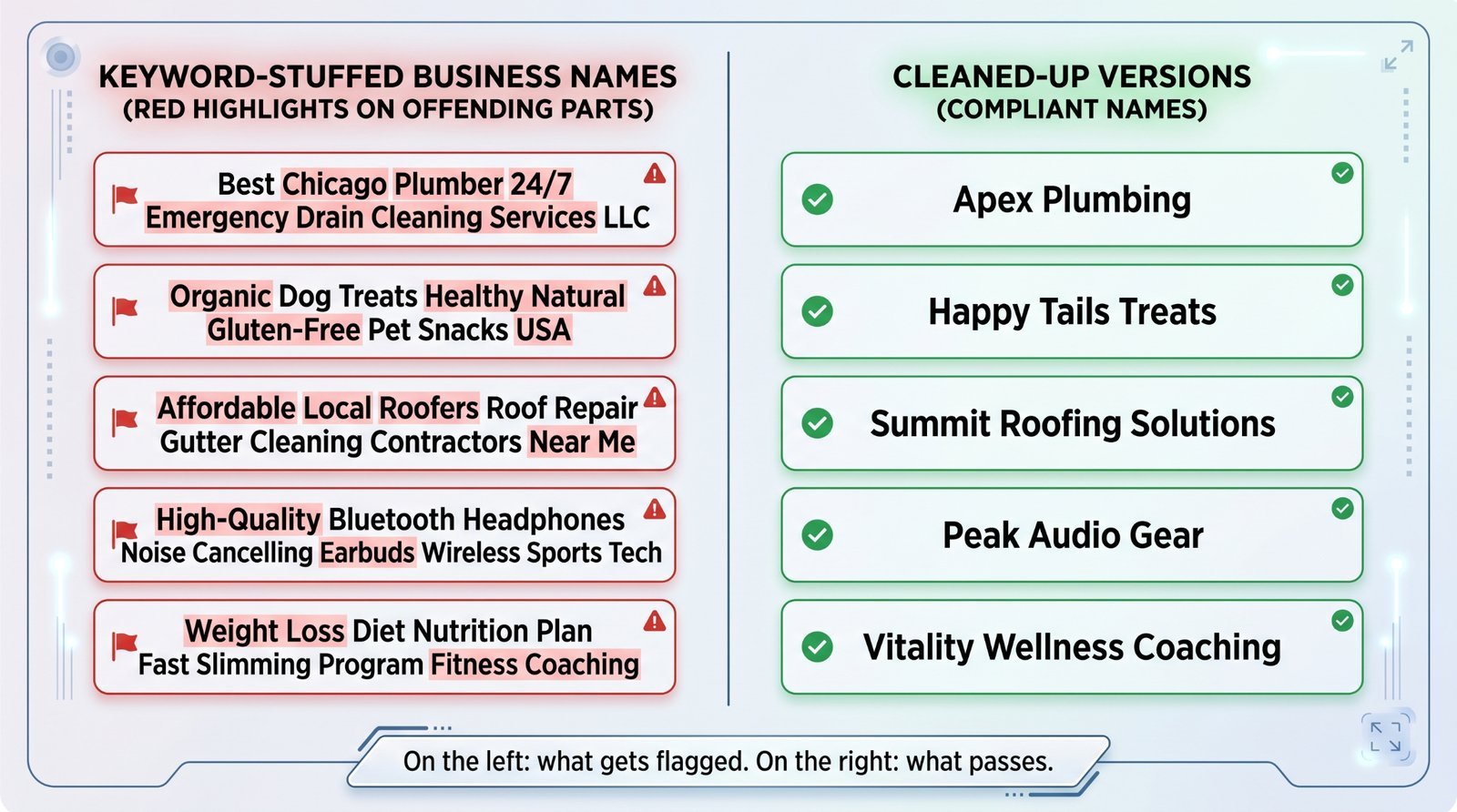
- Location keywords in the name: Submitting a name like “Bob’s Plumbing San Diego” is an immediate red flag unless "San Diego" is an inseparable part of your legally registered brand. If your physical storefront signage, official documentation, and website header simply say “Bob’s Plumbing,” appending the city name will be flagged as an unauthorised SEO manipulation.
- Service descriptors: Changing a name to “Sarah Lee Plumbing Emergency 24/7” triggers systemic filters. Core specialisations like emergency dispatch, drain clearing, water heater maintenance, or leak detection belong strictly within your services list, not within the business name field.
- Superlatives: The inclusion of subjective, promotional words such as “Best,” “Top,” “Cheapest,” or “Affordable” acts as an explicit algorithmic trigger. Phrases like “Best Plumber San Diego” function as advertising copy, not a legitimate corporate moniker.
- Stacked keywords: Chaining multiple distinct service categories together—for example, “Miller Home Services Plumber Electrician Handyman”—signals to Google that you are trying to force rankings for several distinct search intents simultaneously.
- Inconsistency with external signals: If your website domain and metadata read “Bob’s Plumbing” but your GBP edit introduces “Bob’s Plumbing & Emergency Services 24/7,” Gemini identifies a clear discrepancy. The AI expects alignment across your digital footprint, including storefront photography, logos, and digital invoices.
- Sudden name expansion: If a historical profile has operated under the clean name “Bob’s Plumbing” for five years and suddenly updates to “Bob’s Plumbing Best Emergency Service in San Diego,” the sudden influx of high-value keywords looks highly anomalous to automated fraud-detection systems.
What's safe (and easily mistaken for stuffing)
The primary challenge of automated AI enforcement is the risk of false positives. Gemini goes beyond simple word-matching to evaluate whether a complex name represents a legitimate, real-world brand.
- Long legal titles: A name like “Smith & Associates Family Dentistry, LLC” is entirely permissible if that is the exact legal entity and public-facing brand name. However, if your physical monument sign reads only “Smith Family Dentistry,” omit the legal suffix to maintain consistency with public user photos.
- Co-branded identities: Structures like “Toyota of Westgate” or “Westgate Toyota” are completely safe. These follow standard automotive dealership naming conventions, provided they match your web domain and manufacturer agreements.
- Legitimate geographic identifiers: Operating as “Bondi Beach Hair Salon” will not trigger an automatic penalty if that is your registered trading name and matches what sits on your physical awning. A geographic keyword is completely acceptable when it forms the literal root of the brand name.
- Service descriptors as the actual brand name: Registering a business legally as “24/7 Emergency Plumbers” sits right on the baseline. Because it mimics a generic search query, it may trigger an initial automated rejection. If this occurs, you must be fully prepared to defend the profile with hard physical and legal documentation.
The General Principle: What is printed on your physical storefront, your official customer invoices, and your state incorporation papers is safe. Anything added outside of those verified touchpoints introduces systemic risk.
What to do if your edit gets rejected
An automated rejection from Gemini is a clear signal to pause and assess. Continuously submitting the same edit will worsen the situation.
- Do not keep retrying: Repeatedly forcing an identical or slightly altered edit can flag the account for suspicious activity, compounding the issue and potentially moving the profile from a simple edit rejection to a manual suspension.
- Audit the name against policy: Review your submission against theGoogle business-name policy. If the name includes an unverified city, a service description, or a promotional claim, strip the extra text out and simplify the name before trying again.
- Prepare supporting evidence: If the workflow allows, ensure you have clear, unedited storefront photography, utility bills, and business registration certificates readily available to prove the real-world identity matches your submission.
- Utilise the dedicated appeals tool: If a legitimate edit is blocked without cause, do not waste time with standard, generalised support queues. Instead, route your case directly through the officialGoogle Business Profile Appeals Tool.
- Avoid formatting workarounds: Attempting to bypass AI detection by introducing non-standard punctuation, modifying word orders arbitrarily, or using lookalike Unicode characters (such as replacing a Latin "a" with a Cyrillic "а") is highly counterproductive. Advanced models identify these structural anomalies easily, which can severely damage the trust score of your account.
For agencies managing client GBPs
Marketing agencies face unique challenges with this update. Digital marketing teams frequently inherit legacy client accounts that have relied on keyword-stuffed names for years. Correcting these listings is essential for long-term account health, but it requires clear client communication.
- Document the technical rationale early: Explain the risk to your clients clearly before changing their listings: "Google is now deploying automated AI models to instantly flag keyword-heavy business names. To prevent a permanent profile suspension, we are aligning your digital profile directly with your legal branding." This frames the clean-up as proactive risk management rather than a loss of keyword visibility.
- Shift your optimisation focus: Do not rely on business name manipulation for local SEO performance. The marginal ranking value is heavily outweighed by the current risk of profile suspension. Focus instead on optimising primary and secondary categories, building out comprehensive service lists, collecting structured reviews, and publishing relevant local content.
- Establish quarterly profile audits: Conduct structured audits across your entire client portfolio every quarter to catch non-compliant naming patterns before automated systems do.
The bottom line
Google has maintained a clear policy against keyword stuffing for years. The introduction of Gemini simply transitions enforcement from delayed, inconsistent manual reviews to instant, automated algorithmic checks. The period of exploiting patchy enforcement has ended.
The path forward is clear: ensure your Google Business Profile name matches the real-world branding on your storefront. Correct any discrepancies now, on your own terms, before automated filters step in to do it for you.
Want to check your portfolio's risk level?
Visit checklocalseo.com to run an automated local audit. We will flag potential name-compliance issues and suspicious keyword patterns across your listings before Google's AI does.
Frequently asked questions
My business name legitimately includes a location word (like "Brooklyn Bagels"). Will I get flagged?
Probably not, as long as "Brooklyn Bagels" is your actual business name on your signs and corporate paperwork. Gemini looks at the bigger picture—including your website, user photos, and documents. If your entire digital footprint shows that the location word is part of your real brand, you are fine.
I just had an edit rejected with no explanation. What is my next step?
Do not try to force the exact same name through again. First, check your text against the Google business-name policy. If your proposed name edit is completely clean and compliant, use the official Business Profile appeals tool to clear it up. If it contains extra keywords, simplify the text to match your real brand and resubmit.
I run an agency. Should I clean up clients' stuffed names proactively?
Yes. Fixing these issues now on your own terms is far better than waiting for a sudden, automated suspension. Clear communication with the client about the operational risk will help them understand that cleaning up the listing protects their business long-term.
Will my local search rankings drop if I remove keywords from my business name?
You might see a slight, temporary dip in specific keyword rankings, but keeping a stuffed name puts you at risk for a total profile suspension. You can make up for that visibility safely by maximising your categories, expanding your service lists, posting photos, and gathering consistent reviews.
Does Gemini also flag keyword stuffing in descriptions or services?
Google’s announcement specifically targeted business name edits, but the underlying technology shows they are moving toward broader, AI-driven enforcement. It is safe to assume these same strict filters will roll out to descriptions, categories, and service lists in the near future.