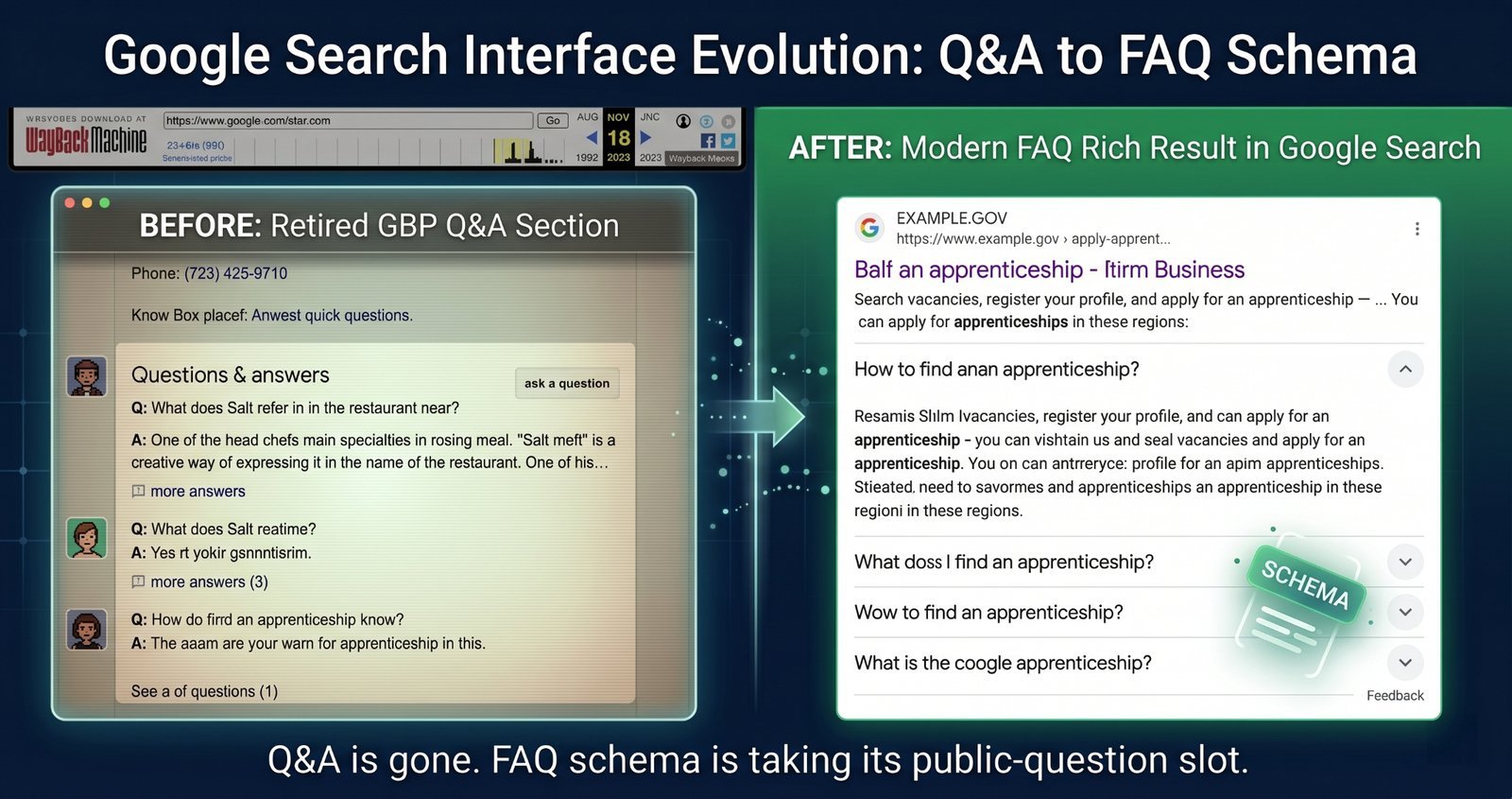
Google quietly killed GBP Q&A in January 2026. Four months later, the obvious question is: what replaced the public “Questions & answers” section that used to sit on Google Business Profiles?
For newer GBP owners: GBP Q&A was the feature that let anyone post a question on a business profile, and let the business — or any Google user — answer it publicly. It worked like a mini FAQ section living directly on your profile. Sometimes that was useful. Sometimes it was a mess.
This is not a look back at an ideal feature that was unjustly removed. Google retired GBP Q&A in January 2026, and businesses now have three replacements: Maps “Ask a Question” for private questions, GBP Messages for chat, and FAQ schema on their websites for public FAQs. The trio works — but most businesses have not adopted the third one. Four months in, here’s what businesses lost, what filled the gap, what still hasn’t been replaced, and what you should set up this week.
What Q&A actually did (and didn't do)
GBP Q&A was simple on paper: customers could ask questions on your Google Business Profile, and anyone could answer. That included the business owner, helpful customers, people who had never visited, competitors, and the occasional troll.
The good version of Q&A was genuinely useful. A customer could land on your profile and quickly see answers to questions like:
- “Do you offer emergency appointments?”
- “Is parking available?”
- “Do you work with kids?”
- “Do you have vegan options?”
This reduced friction before a call, booking, or visit. For businesses that paid attention, Q&A became a free public FAQ section in one of the most visible places on the internet.
The bad version was also common. Businesses ignored it. Answers went stale. Someone would answer a pricing question in 2022 and the answer would still sit there in 2025. Competitors could post misleading responses. Random users could answer with confidence and be completely wrong. Furthermore, the UI was inconsistent; sometimes Q&A was easy to find, and sometimes it felt entirely buried.
Google’s deprecation announcement framed the change as a consolidation of customer engagement features into other channels:
"As part of our efforts to streamline customer interactions and improve the reliability of information on Google Business Profiles, we are consolidating customer engagement features. We encourage merchant communities to utilize direct messaging channels and structured web content to manage frequently asked questions effectively." —Google Business Profile Help Documentation
That framing matters. Google's update went beyond a simple rename; it moved customer questions away from a public, community-driven model and toward private messaging plus business-controlled FAQ content. In plain English: the bad outweighed the good.
The three replacements (and how they actually work)
1. Maps "Ask a Question"
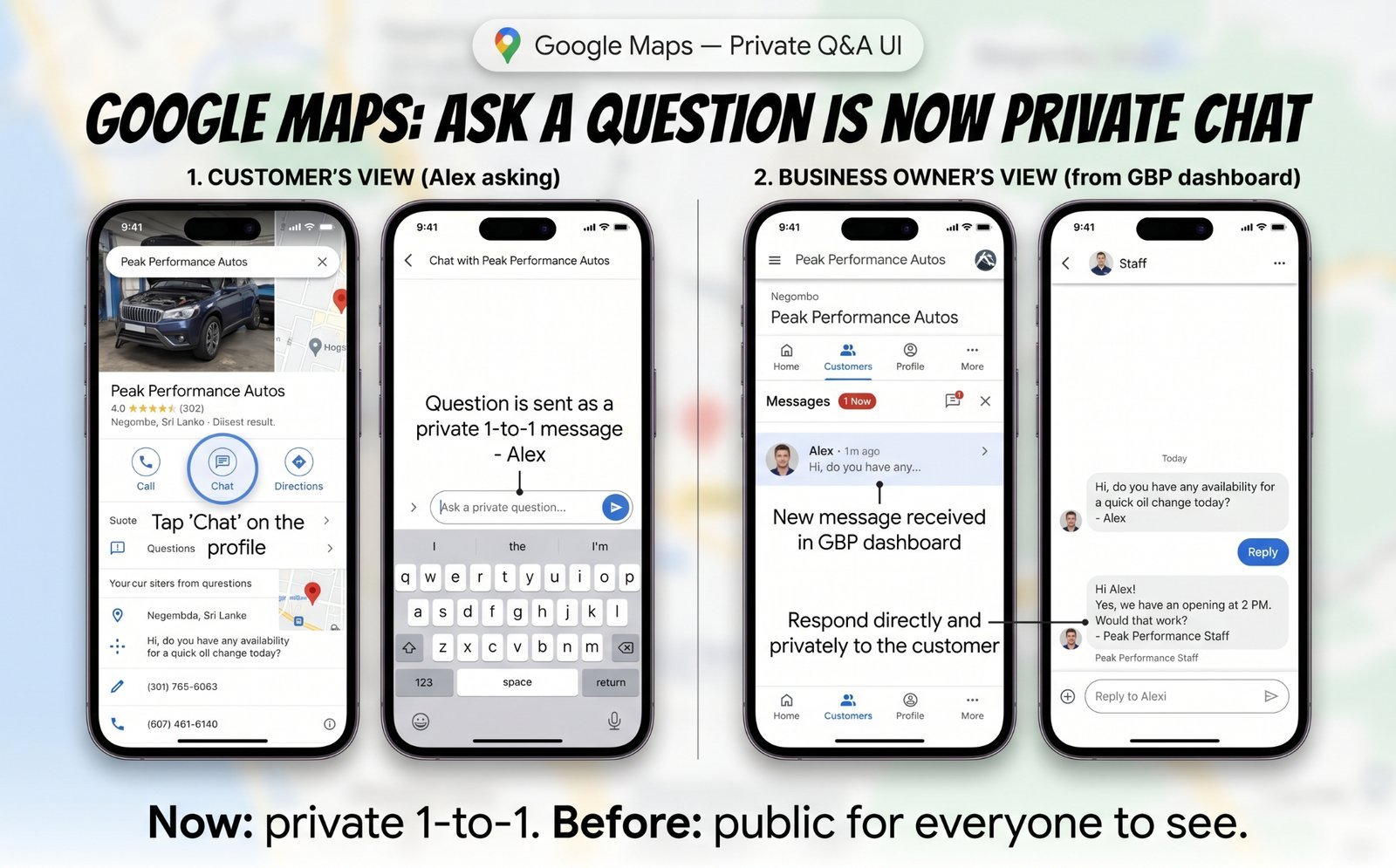
Maps “Ask a Question” is the closest replacement for the old “I have one quick question before I contact you” behavior. A customer sees your business in Google Maps, asks a private question, and the business replies privately through the GBP dashboard or app.
That replaces one useful part of Q&A: the low-friction question. A customer does not need to call or dig through your website. They can ask while they are already looking at your listing.
But it loses the biggest benefit of old Q&A: public visibility. If one person asks whether your clinic has wheelchair access, your answer helps only that individual. The next person with the same question does not see it. That means your team may answer the same questions over and over unless you move those answers somewhere public.
Industry analyst Whitespark wrote in January 2026 that businesses needed to adapt their Maps strategy immediately in its post, “With Google Q&A Gone, You Need a Maps Ask A Question Strategy”. That advice has aged well. If you are getting local leads from Maps, you need a process for private questions.
Setup is usually simple. On most GBPs, Ask a Question is enabled by default. Still, do not assume it is working. Open your GBP dashboard and check Messaging or Customer Engagement settings. Make sure questions route to someone who will actually respond.
Response time matters. Google has been pushing local interactions toward faster, more direct engagement, and slow replies create a poor user experience. Treat these questions like hot leads. Respond within hours, not days.
2. GBP Messages (chat)
GBP Messages is a direct chat from your Business Profile. Depending on what you enable, customers can message through WhatsApp, SMS, or in-Google chat.
This replaces the broader “I want to ask something” intent. It is more conversational than Ask a Question and better suited to back-and-forth situations: booking details, quote questions, product availability, appointment prep, or specific operational constraints.
The tradeoff remains the same: one customer’s chat does not help the next customer. Messaging can convert well, but it does not build a public knowledge base. If ten people ask the same thing in chat this month, your GBP will not automatically turn that into a visible FAQ.
The case for messaging is strong. The 2026 GBP Best Practices Playbook reports that 60% of consumers said WhatsApp is their preferred chat platform to interact with a store, and 67% of people prefer communicating by messaging a business over making a call or sending an email. That tracks with what many local businesses already see: customers often prefer a quick message over a phone call, especially for simple pre-purchase questions.
To set it up, go to your GBP dashboard, choose Edit profile, open Contact, and find the Chat section. Add your WhatsApp number, SMS number, or supported chat option, then save. After that, test it from a customer account to ensure your routing functions correctly.
3. FAQ schema on your website (the most underused replacement)
FAQ schema is the replacement most businesses are missing.
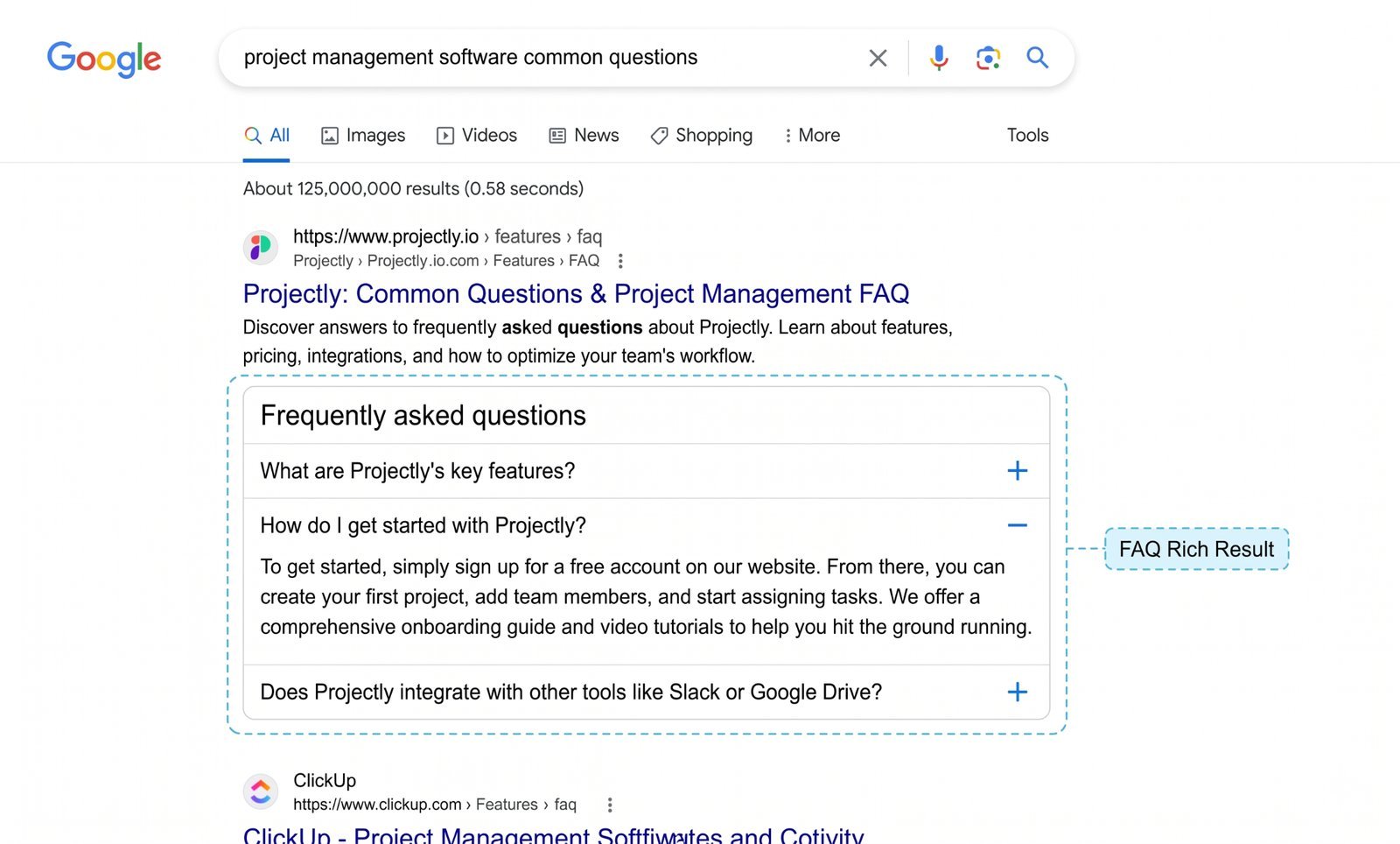
It is structured data markup on your website that lists frequently asked questions and answers in a format Google can read. The standard comes fromSchema.org’s FAQPage specification, and Google documents how it uses FAQ structured data in its officialFAQ rich-result guidance.
In plain English, schema markup is a small block of code in your page’s HTML that tells Google: “This is an FAQ section, and these are the question-and-answer pairs.” You do not need to become a developer to use it. Most modern CMSs have FAQ schema plugins or built-in FAQ blocks.
FAQ schema replaces the public browsing function of old Q&A. It gives customers a place to find common answers before they reach out via other channels, and FAQ schema feeds the same Ask Maps signals.
What it adds is search visibility. A well-marked-up FAQ page can become eligible for rich results: expandable FAQ dropdowns directly in Google Search.
This is the biggest missed opportunity right now. Most businesses have no public FAQ asset at all. They lost GBP Q&A, turned on messaging, and stopped there. That means their most common pre-sale questions are trapped in private conversations.
The Step-by-Step Setup Process
- Identify 5 to 10 real questions: Do not invent SEO-flavoured questions nobody says out loud. Pull from GBP messages, email, call notes, contact forms, receptionist logs, sales conversations, and reviews.
- Write clear answers: Use natural customer language. Two or three sentences is usually enough. If the answer needs an extensive explanation, it deserves its own page.
- Add the FAQ section to a core page: For many businesses, that means the homepage, a service page, or a dedicated /faq page. If the question is service-specific, put it on that exact service page.
- Implement the FAQPage markup: WordPress users can handle this easily with a plugin likeYoast SEO, Schema Pro, or another structured data tool. Wix, Squarespace, Shopify, and similar platforms have built-in FAQ blocks or apps that generate the markup automatically. Custom sites will need a developer to inject the JSON-LD code directly into the header.
- Validate and test: Test the page withGoogle’s Rich Results Test. Fix any errors, publish the page, and wait for Google to crawl it. FAQ rich results can appear within days, though Google's algorithm decides when to display them.
What Was Lost That The Replacements Don't Cover
The first major loss is immediate public visibility for common questions. Q&A allowed customers to browse questions directly on the profile. Ask a Question and Messages are entirely private. The FAQ schema replaces the public layer, but only if the business takes the time to build it.
The second loss is community-driven knowledge. Old Q&A had plenty of junk, but not every non-owner answer was bad. Sometimes customers added helpful local context, such as which entrance is accessible, whether staff speak a certain language, what parking is easiest, or how the business handles unique customer scenarios. That kind of lived experience no longer has a natural home on the profile.
The third loss hits micro-businesses without websites hardest. Q&A served as a free FAQ asset that required zero web development. A food truck, solo tradesperson, or small clinic could answer public questions without touching a CMS. Without a website FAQ, those answers are completely gone.
Because of this shift, local marketing assessments must evolve. If a local SEO audit still treats FAQ schema as optional polish, it fails to match how Google now handles customer questions.
A 30-Minute Checklist To Fill The Gap
- [ ] Enable Maps "Ask a Question" responses: Check that the feature is available, verify notifications work, and assign someone to monitor it.
- [ ] Enable GBP Messages: Add a chat channel such as WhatsApp, SMS, or in-Google chat, then test it from an outside account.
- [ ] Audit your messages from the last 60 days: Pull the five to ten questions customers repeat most often.
- [ ] Write FAQ entries for each: Use plain customer language. Keep answers short, accurate, and specific.
- [ ] Add FAQ schema to your website: Use a CMS plugin if you are non-technical, or hand-write the JSON-LD if you manage code directly.
- [ ] Validate the schema: Test your URLs atsearch.google.com/test/rich-results.
- [ ] Build internal paths: Link to your FAQ page from your homepage, services page, and GBP description so customers can easily navigate to it.
- [ ] Establish a review cycle: Refresh FAQs quarterly based on incoming messages, calls, and emails.
For Agencies — The Faq Schema Opportunity
Most clients still do not have the FAQ schema on their sites. That makes this a clean, high-value agency engagement: it requires low effort, is easy to explain, and delivers measurable results in Google Search Console when rich results begin to appear.
The positioning to clients is direct:
“Q&A is gone from your business profile. Let’s set up your website FAQ properly so you don’t lose that public visibility in local search results.”
This also bundles perfectly with site speed, indexing, and Core Web Vitals optimisations. FAQ schema projects frequently expose other technical issues, such as thin service pages, weak internal linking patterns, plugin bloat, or rigid CMS templates that make basic updates more difficult than necessary.
Avoid selling it as a guaranteed ranking hack. Instead, position it as a way to replace a lost customer information layer while making the site much easier for both search engines and prospects to understand.
The Bottom Line
GBP Q&A is gone, and most businesses have not replaced it properly. Maps Ask a Question and GBP Messages handle private customer questions well, but they do not create a public FAQ asset. The FAQ schema fills that gap.
If you complete one local SEO task this quarter, make it this: turn your repeated customer questions into a real website FAQ page backed by valid FAQ schema.
Want to check your visibility?Run a free audit at checklocalseo.com — we'll instantly flag if your site is missing FAQ schema and other critical structured data.