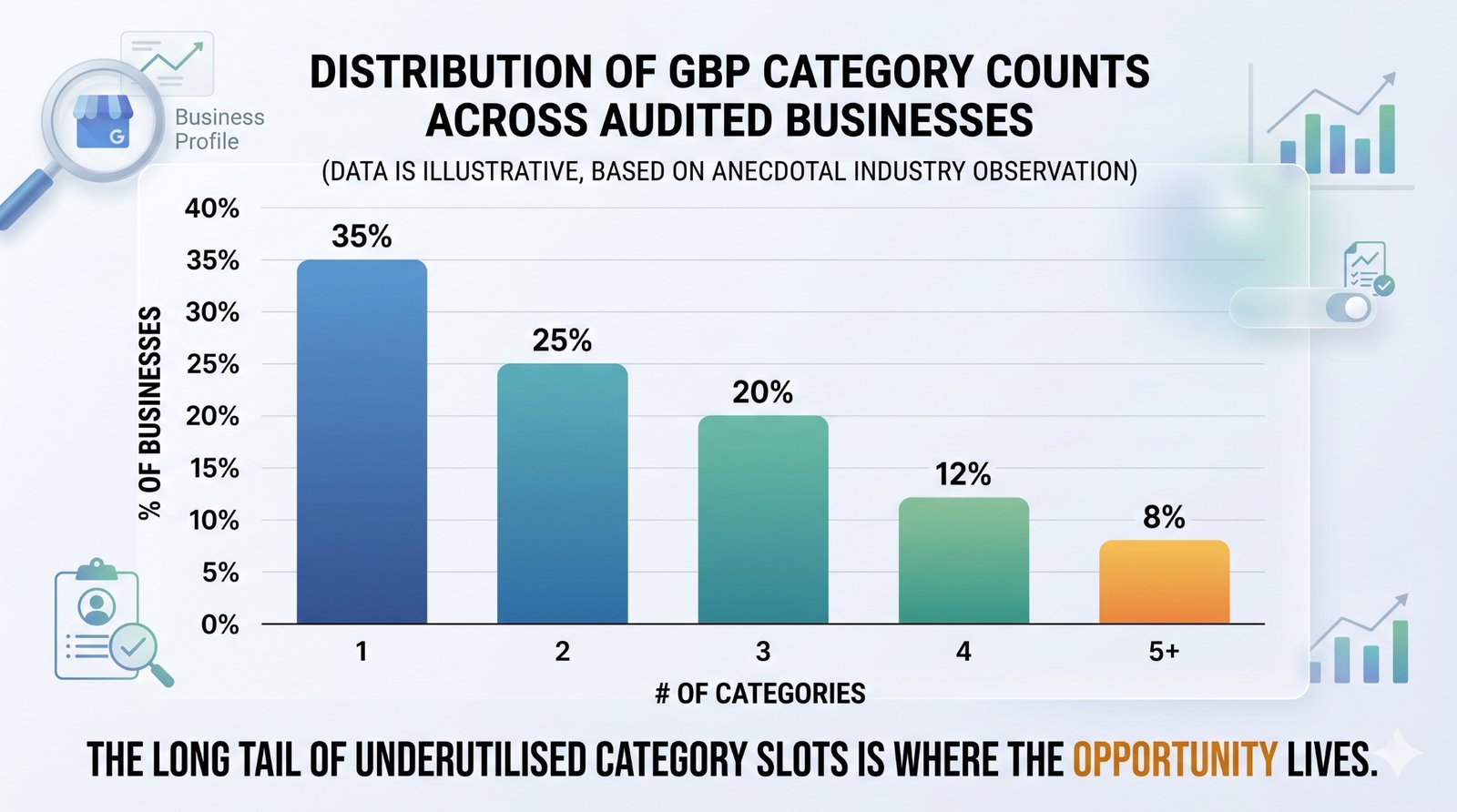
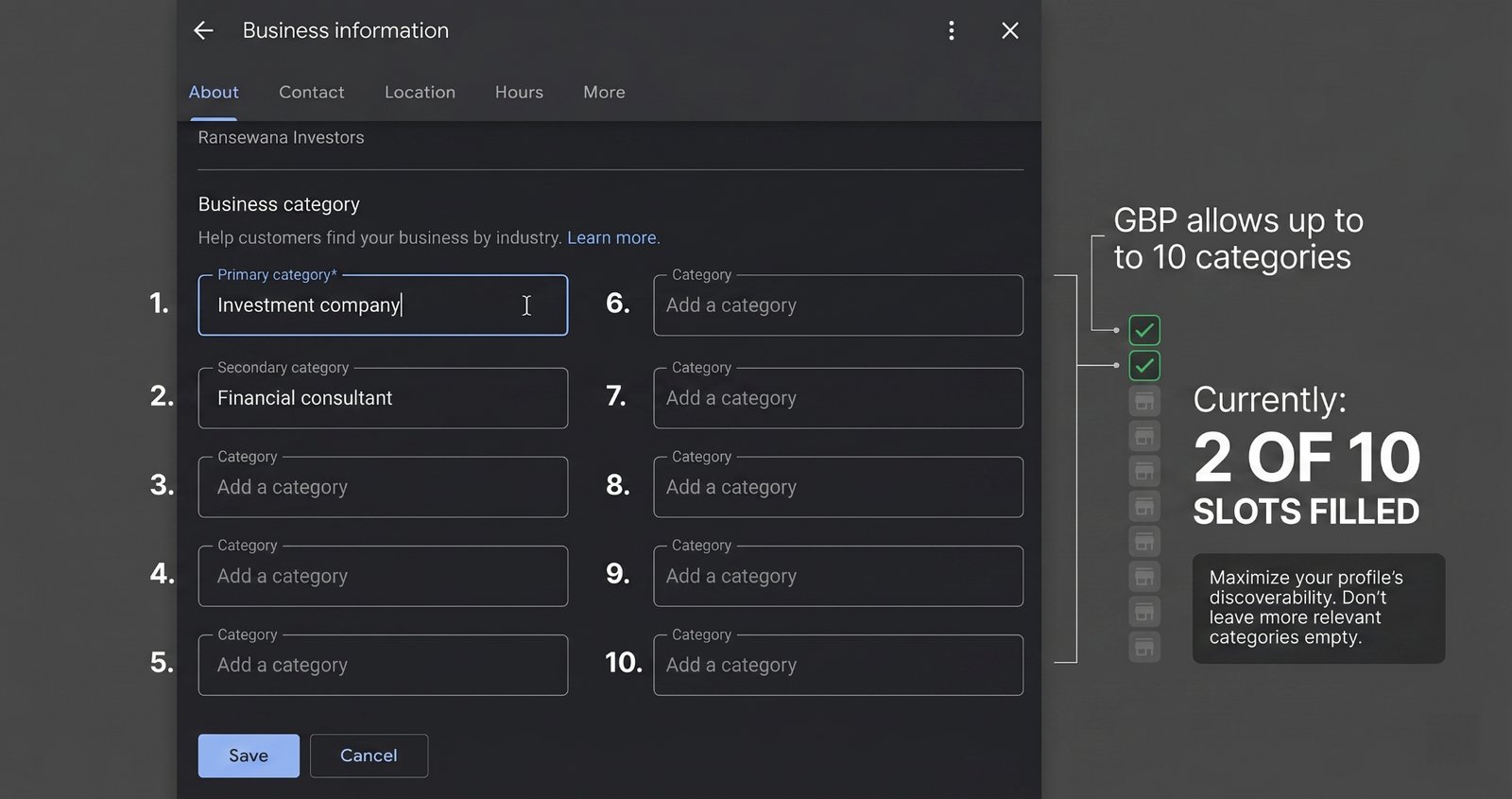
Google says your Business Profile can have 10 categories: one primary category and nine secondary categories. Yet, most businesses only use one or two.
This massive gap represents one of the single biggest unexploited levers in local SEO. Because Google explicitly allows 10 GBP categories per business, leaving nine of them blank means you are missing out on significant visibility. Adding accurate secondary categories can double or triple the search pool your business is eligible for—without requiring updates to your website, reviews, links, or content.
This guide breaks down exactly why categories matter, how to find the right ones for your business, and the critical mistakes that can get your profile rejected or hurt your local rankings.
Why categories matter more than you think
Categories are not just cosmetic labels on your Google Business Profile (GBP). They act as a foundational filter that determines whether your business is even considered for a local search.
Google states this clearly in its 2026 GBP Best Practices Playbook:
"Google Business Profile categories are crucial for your online visibility. They act as direct signals to Google, clearly defining your business's core services and products. Selecting these categories ensures your profile appears in the most relevant Google Search and Maps results."
Consider the mechanics on Google's end. When a user searches Google Maps for a "plumber near me," Google does not immediately rank every local business in town. First, it filters for businesses whose primary or secondary categories explicitly match that specific search intent.
Categories are the gateway for this filter. If your profile lacks a relevant primary or secondary category, you will not enter the ranking pool at all.
Once you pass that initial filter, Google ranks the remaining businesses using traditional local signals: proximity, prominence, reviews, relevance, and website authority. However, none of those signals matters if your business was filtered out before the ranking process even began.
Many business owners approach local SEO backwards. They assume ranking is strictly about "doing more SEO"—writing new pages, gathering reviews, building citations, or publishing updates. While those actions are valuable, categories function differently. They are a core configuration choice that gates all subsequent optimisation efforts.
For a broader perspective on how Google processes local signals,see also how Ask Maps changes which signals Google reads. But for the vast majority of local businesses, tightening your category setup remains the absolute highest-priority check.
The 10 vs 2 gap
Google’s official documentation establishes a clear threshold:
"You may add up to 10 categories in total: one primary and nine secondary."
The playbook further details the cooperative relationship between these selections:
"Your primary business category tells Google your core business, whilst your secondary categories detail other valuable services and products you offer. Now you'll appear in more specific searches, connecting you with a wider range of potential customers."
Despite this, a stark gap remains. Google provides a primary slot and nine secondary options, yet most businesses select their primary category during setup, add perhaps a single secondary category, and never revisit the settings.
This neglect happens because profile creation is frequently treated as a one-time administrative task. An owner launches their GBP, selects "Plumber," "Dentist," "Restaurant," or "Hair Salon," and moves on. Years later, the business may have expanded its service offerings or targeted entirely new jobs, but its category map remains frozen in time.
The consequence is wasted search eligibility. For example, a plumbing business might rank excellently for "plumber near me," but miss out entirely on high-intent terms like "drain cleaning service," "emergency plumber," "water heater repair service," or "septic tank service" simply because those services map to distinct Google categories.
Similarly, a dining establishment might default to a broad "Restaurant" label when "Italian Restaurant," "Pizza Restaurant," or "Seafood Restaurant" would capture a far more qualified audience. Optimising this field accurately describes your operations using the fields Google already provides.
Google’s performance data highlights the value of profile optimisation. According to official benchmarks:
- 29% of customers are more likely to consider purchasing from businesses with a detailed profile.
- Complete profiles earn 5x more views than under-optimised ones.
- Businesses with fully complete profiles receive 7x more clicks.
Ensuring your category list is fully populated is a massive component of profile completeness because it directly controls where your profile is allowed to compete.
How to find the right secondary categories
When building your list, always ground your choices in your actual business operations rather than Google's raw list. Instead of stuffing every high-volume keyword into your profile, focus on matching your real, day-to-day services to Google’s pre-defined taxonomy.
Follow this practical, step-by-step process:
- List every service or product you offer: Write down everything you do before opening your dashboard. A plumber’s list might include emergency plumbing, drain cleaning, water heater installation, septic tank service, and leak detection. Do not worry about official terminology yet—just document your actual business capabilities.
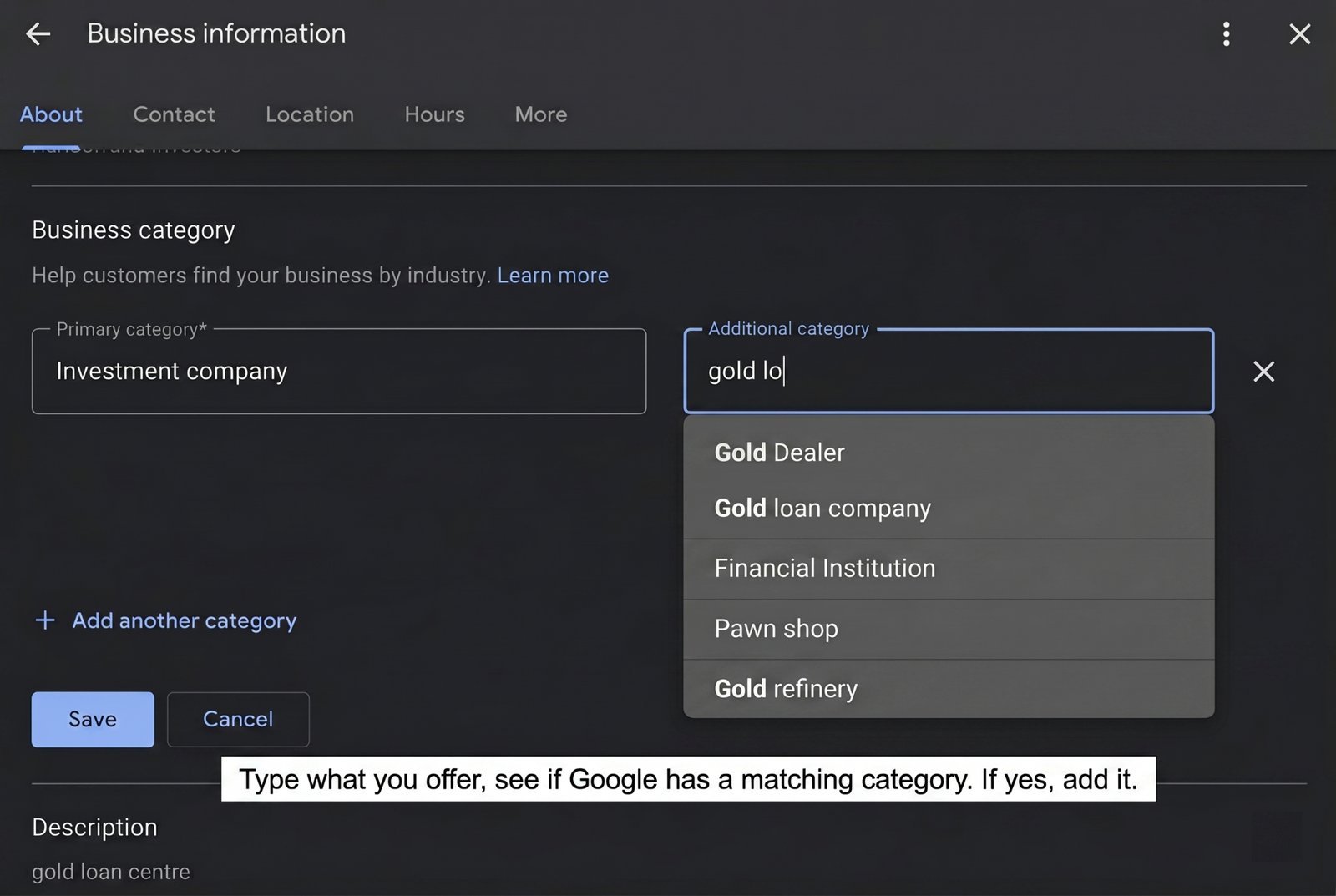
- Search your terms in the GBP category picker: Inside your GBP dashboard, navigate to Edit profile → Business category and type in your services. Google's autocomplete will display its official pre-defined options. Remember, you cannot create custom categories; you must select from Google's established list.
- Filter for a genuine fit: You will inevitably find services that lack a direct category match. That is perfectly normal. Those specific terms belong in your website copy, your dedicated services list, and your local landing pages—not forced into your GBP categories.
- Analyse competitor categories: Search Google Maps for your top local competitors and audit their visible categories. You are not copying them blindly; you are calibrating against the local market. If multiple high-ranking competitors utilize a specific secondary category that you omitted, evaluate whether it fits your business model. You can track these hidden categories using the officialGoogle Category Policy Doc or third-party mapping trackers.
- Prioritise high-volume search gaps: Use tools like Google Keyword Planner or search autocomplete to gauge local demand. If a specific category aligns with a service that customers search for daily, prioritise it over a niche service you perform only a few times a year.
- Add your selections carefully: Go to Edit profile → Business category → Add another category. You can add up to nine secondary categories, but you do not need to use all of them. Keeping slots empty is vastly superior to adding inaccurate categories.
- Save and monitor: Category updates typically take 24 to 72 hours to fully propagate across Google's infrastructure. Monitor your visibility over the subsequent weeks rather than expecting instantaneous shifts.
The strongest secondary categories are always accurate, specific, and commercially meaningful. If you actively offer a service, customers regularly search for it, and Google provides a matching category, it belongs on your profile.
The mistakes that get categories rejected (or hurt you)
- Adding categories for services you do not provide: This is the most common and dangerous error. It is tempting to add a high-volume category simply because a competitor uses it, but if you do not offer that service, leave it off. Google cross-references your profile against your website content, customer reviews, uploaded photos, and user edits. Fabricating categories can trigger account reviews and increase your risk of profile suspension.
- Choosing overly broad categories: Using a generic tag like "Restaurant" is far less effective than selecting "Italian Restaurant" if that matches your menu. Specificity beats breadth because it satisfies precise user intent and positions you in a highly relevant, less diluted competitive pool.
- Selecting heavily overlapping categories: Certain categories carry so much semantic overlap that stacking them provides zero additional benefit. Selecting "Plumber," "Emergency Plumber," and "24-Hour Plumber" simultaneously may be redundant depending on your regional search behaviour. Focus on the most precise, accurate representations rather than treating the fields like keyword tags.
- Ignoring regional variations: Google adjusts its available business categories based on geographic regions. An Australian or UK business will often see distinct category choices compared to a US-based entity. Always work directly from what is available in your active dashboard rather than relying on unverified international lists.
- Changing your primary category casually: Your primary category is the single heaviest relevancy signal you send to Google. It defines your core business identity. Changing it resets a portion of Google's trust evaluation and can cause temporary volatility in your rankings. Only adjust your primary category if your business has undergone a genuine structural pivot.
A 10-minute category audit
Here is the quick version you can do today:
- [ ] Open your official Google Business Profile dashboard.
- [ ] Document your current primary category and any active secondary categories.
- [ ] Open a blank document and list every service or product your business currently fulfils.
- [ ] Test each item within the GBP category picker to identify exact autocomplete matches.
- [ ] Add up to 8 highly relevant secondary categories based on your actual offerings.
- [ ] Save your changes.
- [ ] Review your search visibility and local rankings in 1–2 weeks.
Do not judge the change by one keyword from one location. Check a spread of searches that map to the new categories. If you added “Drain Cleaning Service,” watch drain-related queries. If you added “Water Heater Repair Service,” watch water-heater queries.
Read how Google’s AI now uses your Business Profile to answer local search questions — and what businesses must optimise next.
For Agencies: The Highest-Leverage Client Quick Win
For local SEO and digital marketing agencies, a category audit represents one of the fastest, most impactful optimisations you can perform on a client's account.
Because the vast majority of onboarding clients only utilise one or two categories, you can instantly unlock massive search eligibility before writing a single line of copy, building backlinks, or managing citations. It is a simple configuration update that delivers immediate, measurable footprint expansion into search pools where the client was previously invisible.
This makes it an exceptional trust-building tool for new client relationships. You can present a clear, data-backed gap analysis: "Google allows ten categories to maximise your reach, but your profile is only using two. Here is exactly what we are missing."
To maximise client buy-in, document your exact keyword visibility baselines, implement the clean category updates, and track the performance shift over a 30-day window. Local category updates are uniquely satisfying to report because the attribution is incredibly clean—you can tie traffic and impression growth directly to the newly introduced service categories. Just ensure your team avoids the temptation to treat these fields as a keyword-stuffing exercise.
The bottom line
The vast majority of local SEO strategies focus on climbing higher within the search pools where you are already competing. Category optimisation operates on a much larger scale: it dictates which search pools you are permitted to enter in the first place.
Google gives you 10 category slots. Most of your local competitors are currently wasting eight of them. Capitalise on this structural gap, update your profile accurately, and capture the market share they are leaving on the table.
Ready to find your hidden search opportunities? Run a free audit at checklocalseo.com—we will instantly flag every official category your business should be using but isn't.
Frequently Asked Questions
Q: How do I know if a category exists in Google's list?
A: Open your GBP dashboard, navigate to Edit profile → Business category, and begin typing your service. Google's native autocomplete will display any matching, pre-defined options. If an exact match for your internal terminology doesn't appear, select the closest official alternative.
Q: Will adding more categories dilute my primary category's strength?
A: No. Your primary category retains its full weight and core identity status. Secondary categories act as purely additive signals.
Q: How often should I review my business categories?
A: Perform a dedicated review during your initial setup, and re-verify your configuration every six months. You should also audit your categories immediately whenever you launch a new core service line or when Google quietly updates its official category database.
Q: I run two distinct businesses out of one physical location. Should they share a single GBP?
A: Generally, no. If the businesses feature unique branding, separate service sets, and distinct customer bases, they each require an independent, dedicated GBP.
Q: My competitors don't show secondary categories on their public listings. How can I uncover what they use?
A: Google only displays a business’s primary category publicly at the top of its Maps listing. To audit a competitor's secondary categories, you must inspect the profile via the Google Maps API or utilise reputable local SEO tools like Pleper or BrightLocal to parse the underlying profile data.